Manage Hotel Content Centrally: More Than 50 New Improvements to ADDITIVE+ CONTENTS

Images and videos, as well as offers, prices, and spa treatments, are essential to day-to-day hotel marketing – and they often need to be available in multiple languages. ADDITIVE+ CONTENTS brings all this information together on one central platform and makes it available across the entire ADDITIVE+ SOFTWARE product suite. The software solution has now been extensively modernized with more than 50 new features and improvements.
Why Centralized Content Management Matters in Hotel Marketing

ADDITIVE+ CONTENTS is the central content management solution for all products in the ADDITIVE+ SOFTWARE suite. It provides a reliable foundation for managing hotel content efficiently. Hotels can maintain multimedia content such as photos and videos, as well as offers and spa treatments in multiple languages. They can then use this content across various marketing activities and ADDITIVE+ SOFTWARE solutions.
Hotels continuously create content and use it across a wide range of marketing activities. A seasonal offer may need to appear in a newsletter, a wellness treatment may need to be available in the voucher shop, and new hotel images may be required for several campaigns.
Managing this content separately in different places creates unnecessary work. Teams have to enter the same information multiple times, review each translated description individually, and repeatedly search for the right images. It also increases the risk of using inconsistent prices, outdated photos, or incomplete copy.
Centralized management in ADDITIVE+ CONTENTS simplifies ongoing content maintenance. It also gives hotels a clearer overview of which content is available, up to date, and ready for use in specific marketing activities.



The application has been extensively modernized with more than 50 improvements. The updates focus on a clearer content overview, new filtering options, streamlined management of language versions, and simple tools for organizing large image and video libraries.
Filter Hotel Content by Software Solution and Manage It Centrally
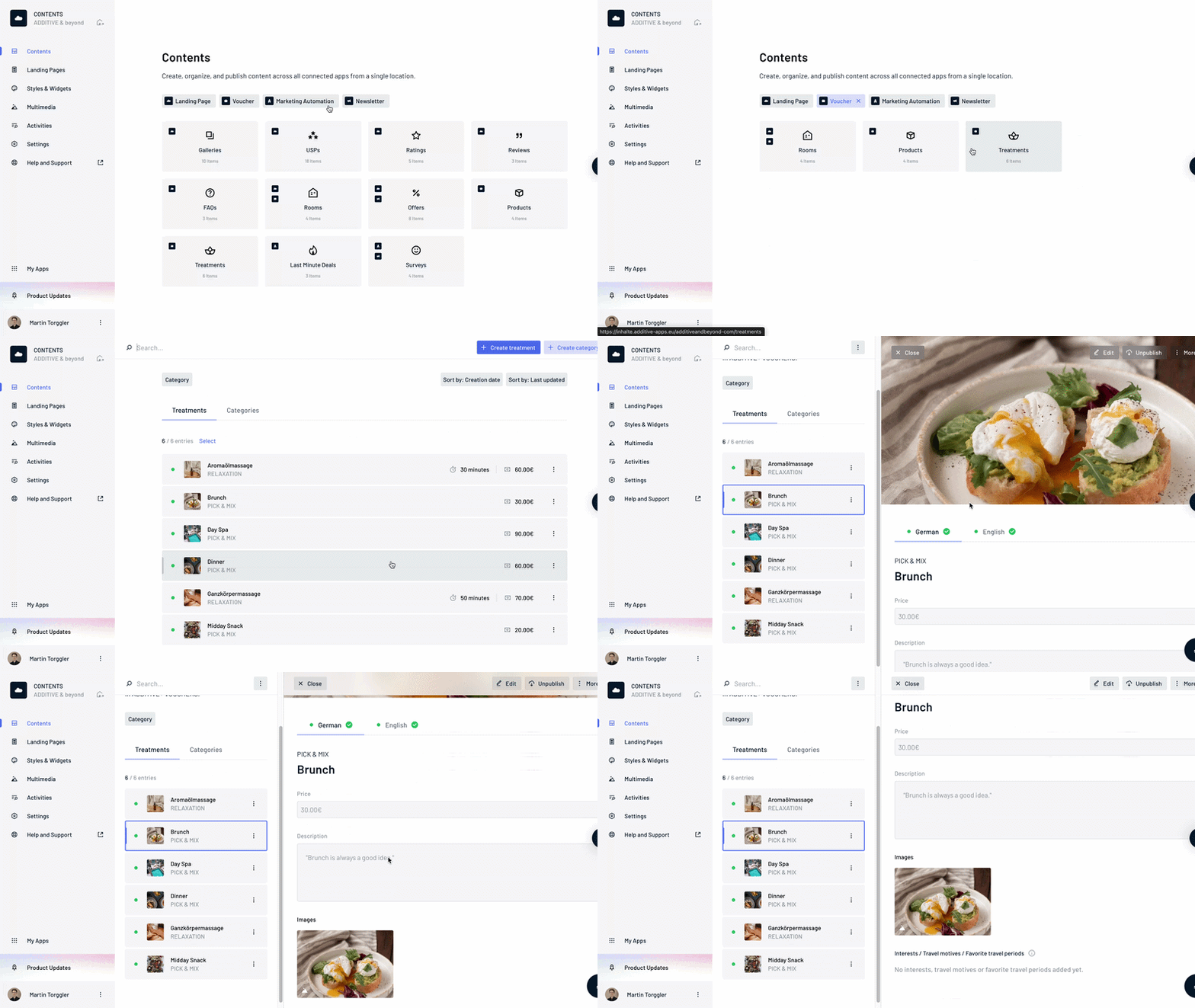
Not every piece of content is needed in every application. The redesigned overview therefore allows users to filter content by the relevant ADDITIVE software solution. For example, they can narrow down content based on whether it is used in ADDITIVE+ NEWSLETTER, ADDITIVE+ VOUCHERS, or ADDITIVE+ MARKETING AUTOMATION.
With a single click, users can access the exact content they need for their current task – whether they are creating a newsletter or setting up a voucher.
When users open a specific content category, such as “Treatments,” additional information appears directly in the list view, depending on the content type. This may include:
- assigned images,
- prices,
- creation date,
- date of the most recent update,
- treatment duration.
Users can review key information without opening every item individually. This makes it easier to see which offers, products, or treatments are complete and where updates may still be required – especially when managing a large volume of content.
Manage Multilingual Hotel Content Reliably
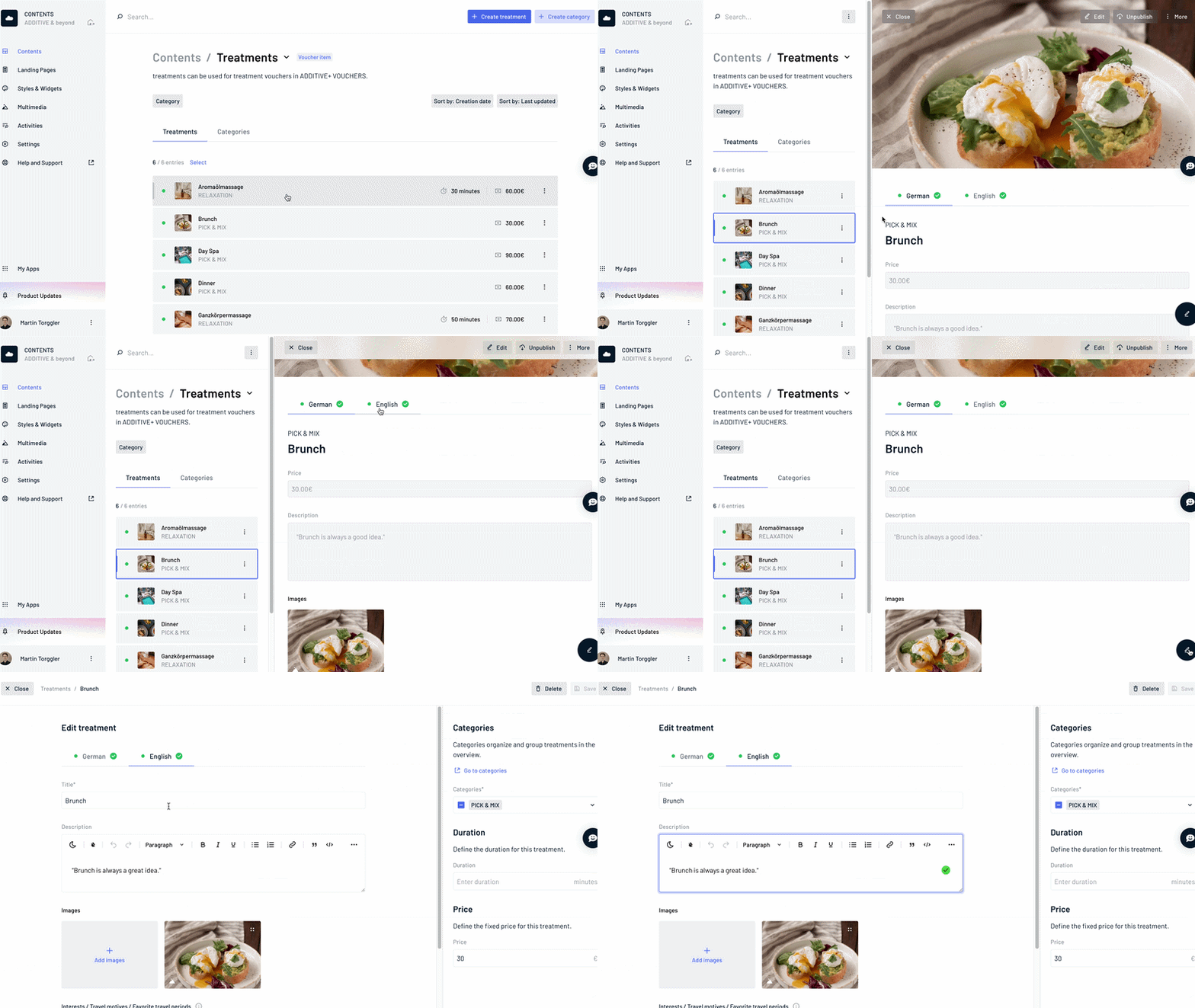
Multilingual content is essential for many hotels. However, every additional language increases the work involved in reviewing and updating content.
The redesigned language-version interface clearly shows which versions are already in use and which have been created but are not yet active.
Hotels can immediately see which language versions are available and where content is still missing. Users can also switch to the required language with a single click and continue editing directly.
This provides greater confidence when maintaining content and reduces the risk of overlooking incomplete or inactive language versions.
Sort Hotel Content by Update or Creation Date
Different tasks require different sorting options. In some cases, users may want to see newly created content first. In others, the most recently edited entries may be more relevant.
ADDITIVE+ CONTENTS now offers new sorting options based on creation date and the date of the most recent update.
Users can also create a custom order using drag and drop, moving entries directly to the desired position.
The New Multimedia Section: Organize Hotel Images by Photo Shoot, Season, and Campaign
Images are a key part of hotel communications. At the same time, media libraries grow with every photo shoot, season, and new offer.
Room photos, wellness images, culinary photography, and seasonal impressions all need to be stored. More importantly, teams need to find them quickly and use them across different marketing activities.
For this reason, the multimedia section of ADDITIVE+ CONTENTS has also undergone extensive development.
Add Multiple New Images at Once
After a photo shoot or a change of season, hotels often need to add, move, or replace several images at the same time.
Users can now upload new images and videos directly to the multimedia section using drag and drop. This also makes it easy to add larger image collections in a single step.
Users can select multiple existing media files and then:
- move them to another folder,
- download them,
- delete them,
- or place them in a newly created folder.
Folders can be organized by hotel area, season, or campaign. Possible categories include rooms, wellness, dining, summer, winter, or specific offers.
This keeps the media library organized and easy to understand, even as new images are added regularly.
The New List View for File Details
When selecting images, the visual subject is often the main priority. For other tasks, file names and additional information matter more.
In addition to the existing gallery view, users can now choose a new list view.
The gallery view is ideal for visually selecting images. The list view displays file names and other information in a compact format.
Hotels can switch between an image-focused and an information-focused view depending on the task at hand.
This helps teams select the right images for a newsletter and efficiently review large media folders.
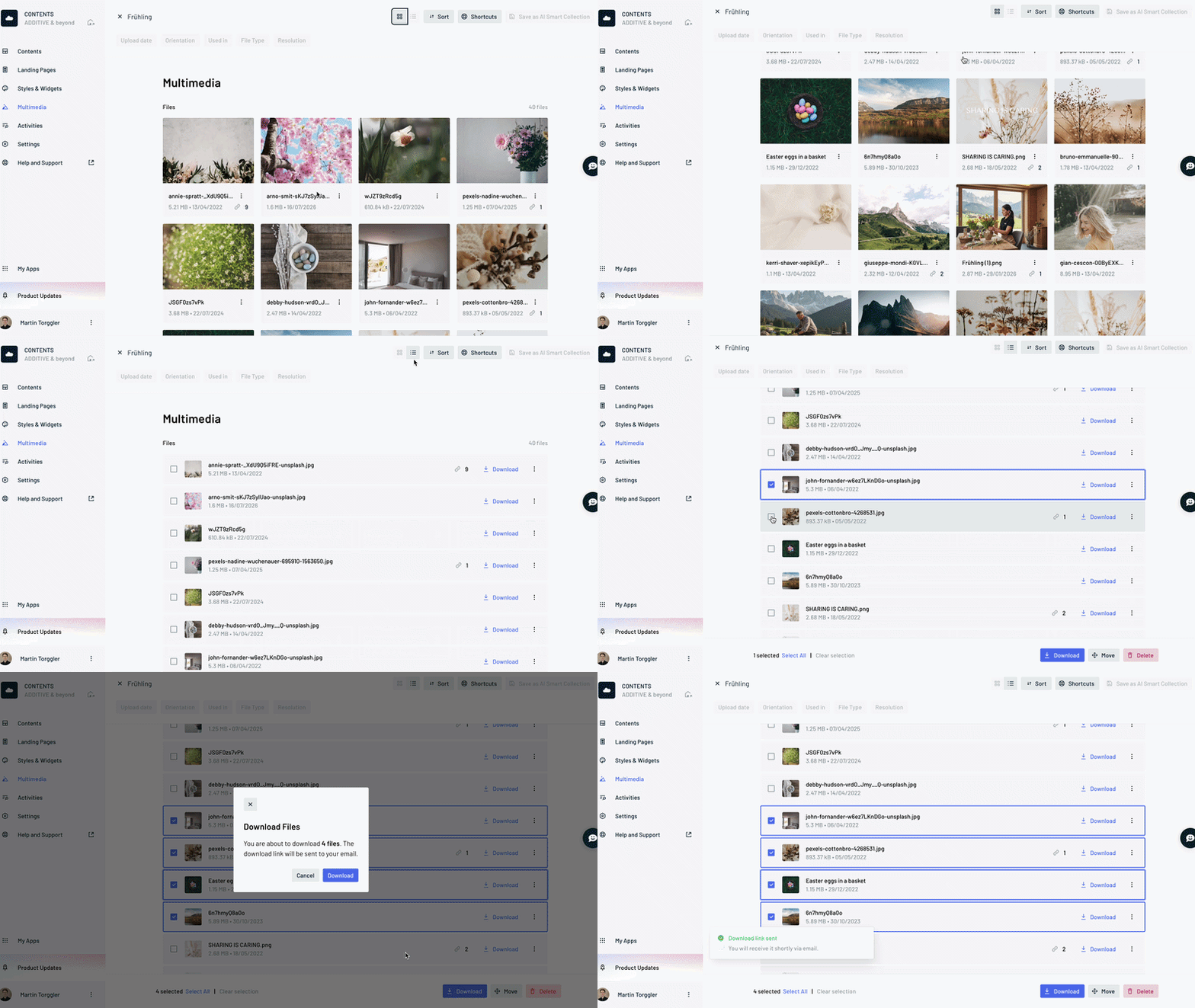
Sort Media by Name, Upload Date, or Custom Order
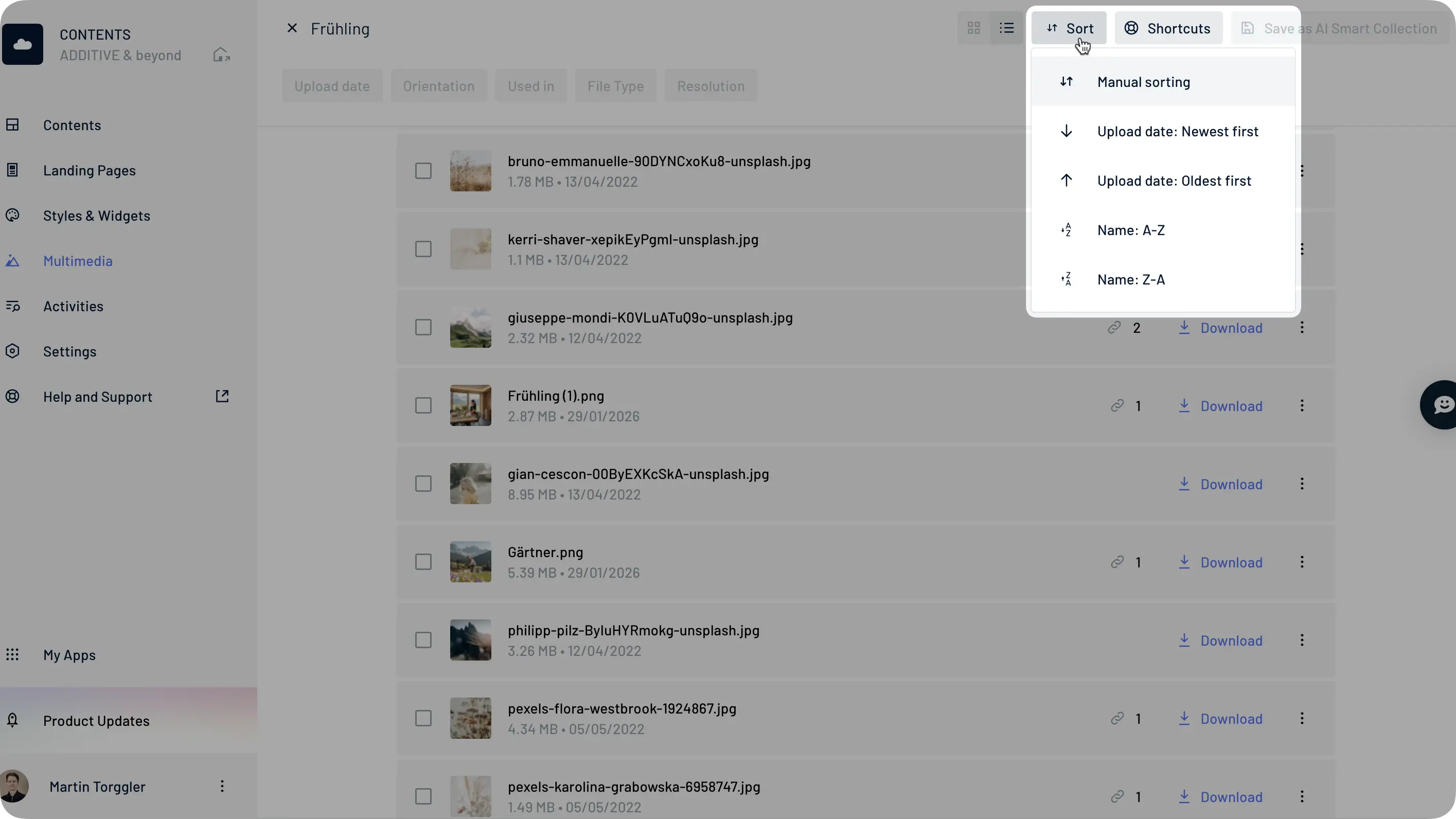
Users can sort images and videos within a folder in several ways:
- alphabetically from A to Z or Z to A,
- by upload date, from oldest to newest or newest to oldest,
- manually in a custom order.
This allows users to display new images first, locate specific files by name, or arrange media based on how they plan to use it.
The application also includes 15 new keyboard shortcuts for frequently repeated tasks. These shortcuts help users browse, select, delete, and move large volumes of media more efficiently.
Find the Right Hotel Images With AI
Two existing features that remain central to ADDITIVE+ CONTENTS are semantic image search and AI Smart Collections.
Semantic image search analyzes the subjects shown throughout the entire media library. Search terms such as “pool,” “wellness,” “family,” or “mountains” lead users directly to relevant images – regardless of where the files are stored or how they are named.
Users can also create an AI Smart Collection from an image search. The collection automatically brings together all images that match the selected topic. When users upload new relevant images later, the collection updates automatically.
Users can remove individual images from a Smart Collection without deleting them from the central media library. This keeps themed image collections up to date while leaving the original media library unchanged.
Conclusion: Centralized Hotel Content as the Foundation for Consistent Marketing
Successful hotel marketing does not begin when a newsletter is sent or a campaign goes live. It begins with the content available to support those activities.
Up-to-date images, complete language versions, transparent pricing, and well-maintained offers provide the foundation hotels need to communicate consistently across different marketing channels.
ADDITIVE+ CONTENTS brings this information together in one central location and makes it available across the entire ADDITIVE+ SOFTWARE product suite. More than 50 new features and improvements have now made this foundation even stronger.
Hotels gain greater control over their content, can manage media libraries systematically, and can reliably use information in newsletters, vouchers, marketing automation, and other digital marketing activities.
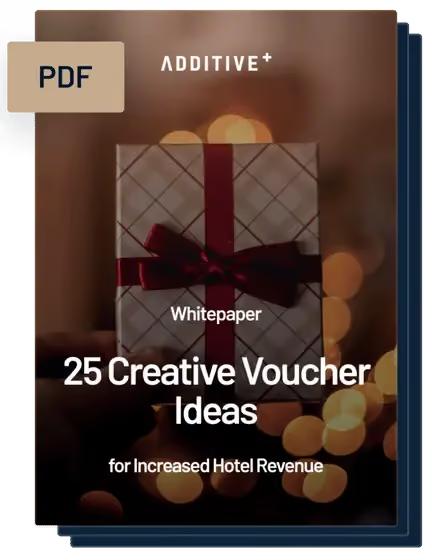
- 25 creative voucher ideas
- Tips for successful voucher marketing in hotels
- For additional revenue and enthusiastic guests

- 25 creative voucher ideas
- Tips for successful voucher marketing in hotels
- For additional revenue and enthusiastic guests
Book your Hotel Marketing Consultation:
15-Minute Expert Session - Free & without Obligation
- Exclusive one-on-one video call — free of charge, with no obligations
- In-depth assessment of your current digital marketing setup
- How to leverage guest data to drive direct revenue growth
- Proven strategies to boost occupancy and booking performance
- 25 creative voucher ideas
- Tips for successful voucher marketing in hotels
- For additional revenue and enthusiastic guests